
A training plan that fits your week
The AI training plan in MAXIMUM Workouts comes from a few questions: up to three goals, training days and duration, location and equipment, special wishes. The app builds exactly two variants from that, “Balanced” and “Intense”, and shows which of your details were considered. One tap applies the chosen plan with all sessions to your training calendar.


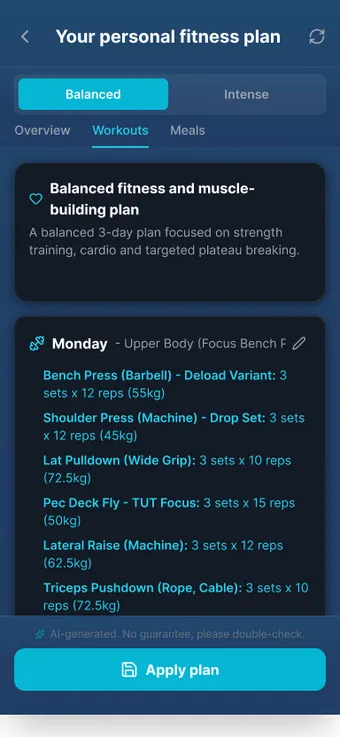
What it does
- Up to three goals
- Body composition, performance, event preparation or health. The first one is the main goal. Free text up to 500 characters and a target date result in a progressive weekly plan.
- 4, 8, 12 weeks or 6 months
- For event goals such as a marathon or triathlon the date is required and determines the duration.
- Your week, your place
- One to seven training days, 15 to 180 minutes, at home, in the gym, outdoors or mixed. Training types and split as you like.
- Two variants, weighted differently
- “Balanced” and “Intense” as complete plans. You pick what fits your week.
- Considers what the coach knows
- Injuries, diet and preferences from the coach memory flow in and are listed as “Considered” below the plan.
- Nutrition as an option
- Tick the box and you get calorie and macro goals plus recipe suggestions that go straight into the recipe book.
- Adjustable before you apply it
- Nutrient goals in the Overview tab, individual training days in the plan editor. Changes go directly into the draft.
- One tap into the calendar
- “Apply plan” creates training plans and calendar entries, start date selectable (preset: next Monday).
- In your phone calendar if you like
- Calendar → gear icon → calendar sync creates a dedicated device calendar with your sessions.
 AI-generated scene
 How it works
- 01 Tap the training area (dumbbell icon) or the “AI coach” dashboard widget. The first time you confirm the privacy notice.
- 02 Four to five steps: goals, details about you if needed, training preferences, nutrition preferences, summary. The profile is prefilled.
- 03 Under “Available equipment” everything is ticked at first. Untick what you do not have, otherwise the AI plans with a full gym.
- 04 Compare the two variants, adjust nutrient goals or individual days if needed, then “Apply plan” and choose a start date.
Limits, honestly
What the feature does not do is also in the in-app manual. The key points up front.
- There are exactly two variants. A third direction costs another generation, and generations per week are limited.
- The plan needs an internet connection and counts toward the AI quota. Until you apply it, it is only a draft.
- “Discard AI plan” affects all AI plans and all their calendar entries at once. Individual plans are better deleted with a swipe gesture.
- When you switch off calendar sync, all appointments the app created in the device calendar are deleted.
- The plan is AI-generated and carries the note “No guarantee, please review”. If you have symptoms or pre-existing conditions, medical advice comes before the plan.
Frequently asked questions
How many plan variants do I get?
Exactly two: “Balanced” and “Intense”. Both are complete weekly plans over the chosen duration, weighted differently.
Does the plan go into the calendar automatically?
After “Apply plan” the app creates training plans and calendar entries from the chosen start date. With calendar sync switched on they also appear in your phone calendar.
Can I change the plan afterwards?
Yes, in the plan editor like any other plan: exercises, sets, rests and alternatives. Nutrient goals are adjusted in the Overview tab.
14 days free. No payment details.
Then a monthly cancellable Premium subscription. Your data stays on your device.