
Spot a standstill before you feel it
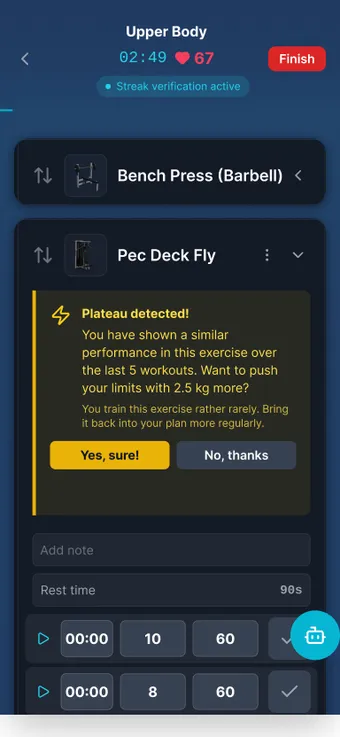
MAXIMUM Workouts records your strength training set by set and calculates the estimated maximum for every exercise. If it stays flat for three workouts, the app reports “Plateau detected” in the ongoing workout with a concrete suggestion. Alternative exercises are one tap away, the AI analysis interprets the session afterwards, and the overall analysis proposes changes to the plan.


What it does
- Plateau from three workouts
- A plateau counts from three logged sessions without meaningful gains. Progress means at least 2.5 % more estimated 1RM. After 28 active days without gains it is treated as persistent.
- Tells a deload from a standstill
- Deliberately lighter sessions are not counted as a plateau.
- A suggestion to accept or dismiss
- The “Plateau detected” note appears on the exercise with a concrete progression suggestion. Swiped-away notes stay away.
- Records celebrated live
- Highest weight, biggest volume or best estimated 1RM are reported while the set is still in progress.
- Alternatives inside the workout
- From the database or from the ongoing workout, switchable with a tap. The original sets remain as a snapshot.
- A rest timer that keeps running
- Starts on its own, runs in the background, on the lock screen and on the watch. Rest time per exercise, written back into the plan.
- AI training analysis per session
- Workout detail → “Analyze”. Result under “What you should do” and “By exercise”, saved and reused.
- Overall analysis with plan improvements
- Over 90 days and at least five workouts: exercise order, replacements, alternatives. Select and write them straight into the plan with “Apply changes”.
- Dictate instead of typing
- Log exercise, weight and reps by voice, connect a Bluetooth heart-rate strap via the heart icon.
 AI-generated scene
 How it works
- 01 Start a workout, tick off sets with weight and reps. Exercises and sets can be reordered or added mid-workout.
- 02 If an exercise stalls, “Plateau detected” with a suggestion appears when you expand it. Accept, dismiss or pick an alternative from the exercise card menu.
- 03 After the workout, tap “Analyze” in the workout detail: assessment, recommendations per exercise and “Considered” details.
- 04 Open the AI training analysis in the “Overall analysis” dashboard widget, select plan improvements, “Apply changes”.
Limits, honestly
What the feature does not do is also in the in-app manual. The key points up front.
- The 1RM is an estimate according to Epley (weight × (1 + reps ÷ 30)), a trend indicator, not a measured maximum.
- The app calculates the numbers itself, the AI only interprets them. It does not invent weights or trends.
- An alternative initially applies only to this workout. If you want to keep it, you apply the change to the plan directly from the workout.
- The overall analysis needs at least five completed workouts, always covers 90 days and is cached for 24 hours. It is reachable only via the dashboard widget.
- Imported workouts count as unverified and do not count toward the Streak program.
Frequently asked questions
When does the app report a plateau?
From three logged workouts without at least 2.5 % gain in the estimated 1RM of the exercise. After 28 active days without gains it counts as a persistent plateau.
Does the app suggest alternative exercises?
In the ongoing workout, alternatives are ready to choose from, you pick them yourself. Proactive suggestions come from the overall analysis: it proposes exercise order, replacements and new alternatives that you apply with one tap.
Does the training analysis cost AI quota?
Yes, every analysis counts toward the monthly quota. The result is saved and reused when you open it again, only “Analyze again” starts a new run.
14 days free. No payment details.
Then a monthly cancellable Premium subscription. Your data stays on your device.